📎 AI Summary:
The thread discusses issues with copying files from an external hard drive due to permission restrictions, despite disabling security features. The main advice centers on taking ownership of the files through the Security tab and changing permissions, with step-by-step guidance provided by some users. Overall, the sentiment indicates that Windows security settings can be strict and sometimes confusing, but solutions like adjusting ownership and permissions are effective to resolve such access problems.

flob3d

New Member
Member details
Joined
Oct 5, 2013
Messages
2
Thread Author #1
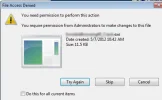
I try to copy from an external hard drive in my computer some files and I have a restriction. I have disabled the firewall and the antivirus but ...the same problem. I tried also properties/ security/ ...change permison. The same 🙁
 

Attachments

  • 1.webp
    1.webp
    13.2 KB · Views: 328
    Microsoft Defender: No threats detected Scan details
Solution
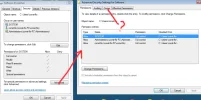
Just click on the owner tab and it will probably show 'SYSTEM' as the current owner. Since it appears your user name is part of the Admin group, just click on the line that shows the group you know you have full admin rights and choose 'change owner'. You'll probably get a warning asking you if your sure you want to take ownership. Just click yes. To ensure you have the needed permissions, click on the next tab. Click on the button halfway up the right side and type in your user name. Once Windows finds it, highlight it and click OK. You will then see all the rights associated with your user name or group. If all are checked you should be able to do what you want with that file or directory. J.C.

strollin

Honorable Member
Member details
Joined
Jul 21, 2013
Messages
284
You need to take ownership of the file. Right-click on the file and select Properties. Then on the Security tab, click Advanced which will show you who the owner is and allow you to change ownership to you.
 

flob3d

New Member
Member details
Joined
Oct 5, 2013
Messages
2
Thread Author #3
Hi, I don't understand very well if you can help me step by step please. Here I made a print screen...
 

Attachments

  • 1.webp
    1.webp
    47.6 KB · Views: 380
    Microsoft Defender: No threats detected Scan details

S2K5150

Extraordinary Member
Member details
Joined
Oct 1, 2013
Messages
43
Just click on the owner tab and it will probably show 'SYSTEM' as the current owner. Since it appears your user name is part of the Admin group, just click on the line that shows the group you know you have full admin rights and choose 'change owner'. You'll probably get a warning asking you if your sure you want to take ownership. Just click yes. To ensure you have the needed permissions, click on the next tab. Click on the button halfway up the right side and type in your user name. Once Windows finds it, highlight it and click OK. You will then see all the rights associated with your user name or group. If all are checked you should be able to do what you want with that file or directory. J.C.
 
Solution

Pauli

Fantastic Member
Premium Supporter
Member details
Joined
Mar 1, 2012
Messages
2,484
Windows 7 is known to be quite paranoid. Being the sole user of my computer, I've built it all, and installed all programs, I still have had this kind of problems. And Windows doesn't seem to be able to solve it every time.

Link Removed is a nice program, has helped me many times.

Hope you get it working, one way or another. 🙂