


- Joined
- Jul 4, 2015
- Messages
- 8,998
- Thread Author
- #1
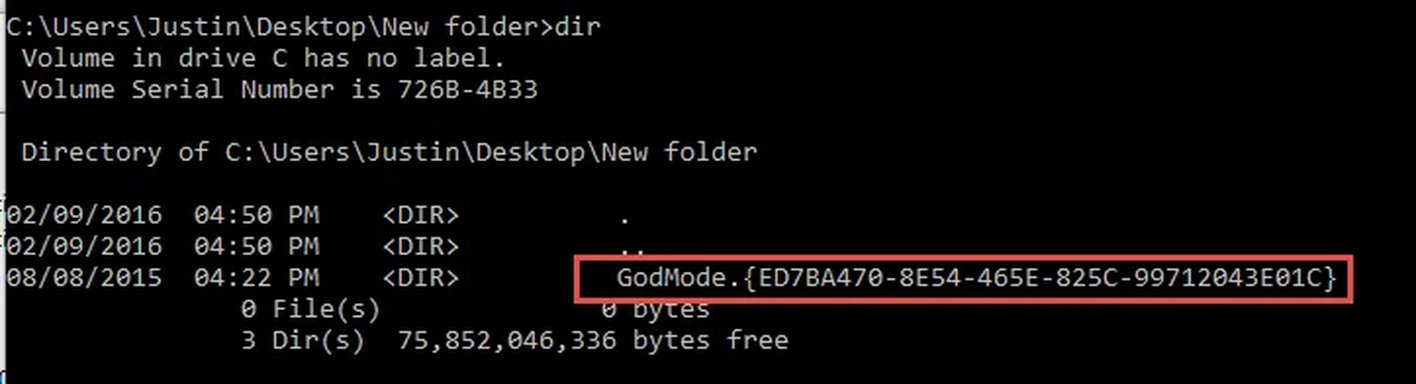
I was bored and decided to look at the GodMode shortcut. For those of you that don't know what that is I'll explain. It's basically a folder shortcut with a special CLSID extension. CLSID is short for Class ID. The godmode shortcut will display a lot of settings available in the Control panel, but they are all in a single window.
[ATTACH type="full" align="right" alt="An AI-generated image of 'Hidden shortcut musings'. 1. Command prompt showing a folder with a 'GodMode' CLSID folder creation.
2. File Explorer displaying CLSID folders with labels for Network and This PC." alt="1. Command prompt showing a folder with a 'GodMode' folder named by a CLSID.
2. File Explorer highlighting folders labeled with CLSIDs linked to system locations." alt="1. Command prompt showing a folder named GodMode with a GUID in the directory listing.
2. File explorer displaying CLSID folders with labels for Network and This PC items." alt="1. Directory listing showing a hidden 'GodMode' folder with a special CLSID.
2. File explorer displaying CLSID folders representing network and PC items." alt="1. Windows command prompt showing a GodMode folder in a directory listing.
2. File Explorer displaying CLSID folders with network and PC labels highlighted." alt="The images show Windows Explorer folders with CLSID names and a folder named 'GodMode' for system settings access."]31822[/ATTACH]
The only really important part of this is the .{GUID} the first part can be anything. It's certainly a nifty shortcut to have readily available but that isn't what I was curious about. I wanted to know if any of the other CLSID's had any useful functionality. I wrote this powershell script to build shortcuts out of ever CLSID that was available in the registry.
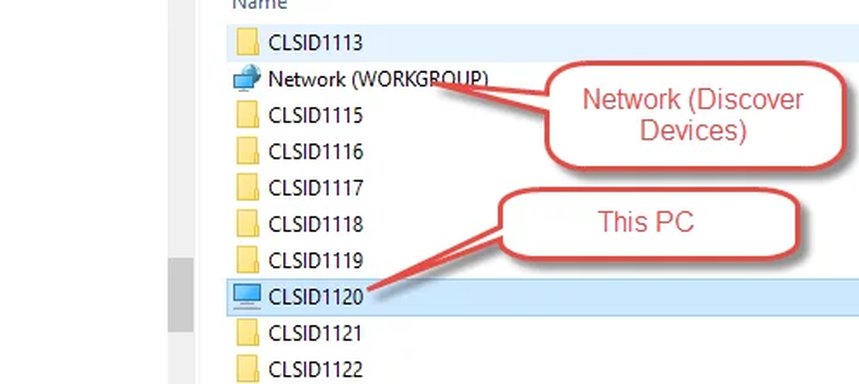
After running it you get a folder called Shortcuts on your desktop with a few thousand other folders inside. If you ran the script you can see that there are quite a few of these that will actually open various things including different sections of the Control Panel, the "This PC" shortcut and even the recycle bin.
[ATTACH type="full" align="right" alt="An AI-generated image of 'Hidden shortcut musings'. 1. Command prompt showing a folder with a 'GodMode' CLSID folder creation.
2. File Explorer displaying CLSID folders with labels for Network and This PC." alt="1. Command prompt showing a folder with a 'GodMode' folder named by a CLSID.
2. File Explorer highlighting folders labeled with CLSIDs linked to system locations." alt="1. Command prompt showing a folder named GodMode with a GUID in the directory listing.
2. File explorer displaying CLSID folders with labels for Network and This PC items." alt="1. Directory listing showing a hidden 'GodMode' folder with a special CLSID.
2. File explorer displaying CLSID folders representing network and PC items." alt="1. Windows command prompt showing a GodMode folder in a directory listing.
2. File Explorer displaying CLSID folders with network and PC labels highlighted." alt="The images show Windows Explorer folders with CLSID names and a folder named 'GodMode' for system settings access."]31823[/ATTACH]
[ATTACH type="full" align="right" alt="An AI-generated image of 'Hidden shortcut musings'. 1. Command prompt showing a folder with a 'GodMode' CLSID folder creation.
2. File Explorer displaying CLSID folders with labels for Network and This PC." alt="1. Command prompt showing a folder with a 'GodMode' folder named by a CLSID.
2. File Explorer highlighting folders labeled with CLSIDs linked to system locations." alt="1. Command prompt showing a folder named GodMode with a GUID in the directory listing.
2. File explorer displaying CLSID folders with labels for Network and This PC items." alt="1. Directory listing showing a hidden 'GodMode' folder with a special CLSID.
2. File explorer displaying CLSID folders representing network and PC items." alt="1. Windows command prompt showing a GodMode folder in a directory listing.
2. File Explorer displaying CLSID folders with network and PC labels highlighted." alt="The images show Windows Explorer folders with CLSID names and a folder named 'GodMode' for system settings access."]31822[/ATTACH]
The only really important part of this is the .{GUID} the first part can be anything. It's certainly a nifty shortcut to have readily available but that isn't what I was curious about. I wanted to know if any of the other CLSID's had any useful functionality. I wrote this powershell script to build shortcuts out of ever CLSID that was available in the registry.
Code:
$saved_directory = "$($env:USERPROFILE)\Desktop\Shortcuts"

New-PSDrive -Name HKCR -PSProvider Registry -Root HKEY_CLASSES_ROOT
PWD | Push-Location

If (Test-Path $saved_directory)
{
    Remove-Item -Path $saved_directory -Recurse -Force
} Else
{
    New-Item -Path $saved_directory -ItemType Directory
}

Set-Location HKCR:
$keys = Get-ChildItem -Path .\CLSID
$index = 1

For($index; $index -le $keys.Count; $index++)
{
    $keysplit = $keys[$index].Name.Split('\')
    $CLSID = $keysplit[$keysplit.Count - 1]
    $dir_name = "CLSID$index.$CLSID"
    New-Item -Path "$saved_directory\$dir_name" -ItemType Directory
}

Pop-Location
After running it you get a folder called Shortcuts on your desktop with a few thousand other folders inside. If you ran the script you can see that there are quite a few of these that will actually open various things including different sections of the Control Panel, the "This PC" shortcut and even the recycle bin.
[ATTACH type="full" align="right" alt="An AI-generated image of 'Hidden shortcut musings'. 1. Command prompt showing a folder with a 'GodMode' CLSID folder creation.
2. File Explorer displaying CLSID folders with labels for Network and This PC." alt="1. Command prompt showing a folder with a 'GodMode' folder named by a CLSID.
2. File Explorer highlighting folders labeled with CLSIDs linked to system locations." alt="1. Command prompt showing a folder named GodMode with a GUID in the directory listing.
2. File explorer displaying CLSID folders with labels for Network and This PC items." alt="1. Directory listing showing a hidden 'GodMode' folder with a special CLSID.
2. File explorer displaying CLSID folders representing network and PC items." alt="1. Windows command prompt showing a GodMode folder in a directory listing.
2. File Explorer displaying CLSID folders with network and PC labels highlighted." alt="The images show Windows Explorer folders with CLSID names and a folder named 'GodMode' for system settings access."]31823[/ATTACH]
Attachments
Last edited by a moderator:

