

Account security, two-step verification, and privacy
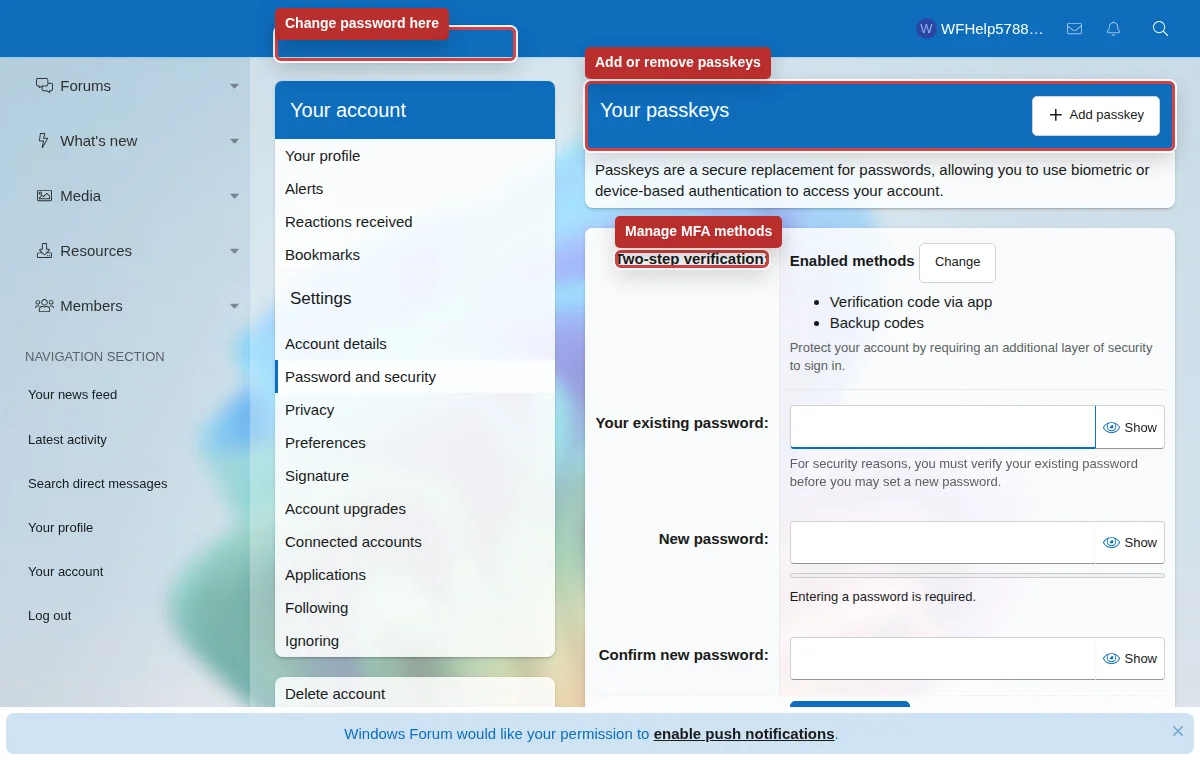
Your account protects your posts, conversations, watched content, alerts, and profile. Use Password and security to control passwords, passkeys, two-step verification, backup codes, and trusted devices.
Listen to this guide
A narrated overview of account security, two-step verification, and privacy basics.
Transcript
Your WindowsForum account protects your posts, watched content, alerts, conversations, and profile. Use a passkey to sign in with your device PIN or biometrics. If you use a password, add an authenticator app, passkey, or supported SMS number for verification. Store backup codes somewhere private, review trusted devices, and keep your email address current. Never post passwords, recovery codes, verification links, or private messages publicly.
What two-step verification means
Two-step verification adds a second check after your password. If someone learns your password, they still need a second method before they can access your account.
WindowsForum supports several methods. You do not need to use all of them, but you should keep at least one primary method and a backup path.
Authenticator app codes
Use an app such as Authy, Google Authenticator, Microsoft Authenticator, 1Password, Bitwarden, or another TOTP-capable app to generate a short verification code.
Passkeys and security keys
Passkeys can use device biometrics, a hardware security key, or your device account. They are phishing-resistant when supported by your browser and device.
SMS verification
Verify a US or Canadian mobile number to receive login codes by text message. Keep a passkey or authenticator app and backup codes available in case texts are delayed or you lose access to that number.
Email and backup codes
Recovery requires access to your email and a saved recovery code. An email or text by itself does not replace a passkey. Save recovery codes somewhere secure.
Recommended setup
- Use a unique password that you do not use on any other site.
- Add an authenticator app or passkey as the primary two-step method.
- Generate backup codes and store them in a password manager or another secure place.
- Review trusted devices periodically. Remove trust from shared, public, or lost devices.
- Update your email address before you lose access to the old mailbox.
Do
- Keep backup codes private.
- Use a password manager when possible.
- Log out on devices you do not control.
- Contact staff quickly if your account may be compromised.
Do not
- Post recovery codes, email verification links, or private messages publicly.
- Share your account with another person.
- Disable all two-step methods unless you have a safer replacement ready.
- Trust a public or work device unless you understand the risk.