

Search, tags, and AI-assisted answers
Search is often the fastest path to an answer, especially when you use exact details from the problem. AI-assisted summaries can help orient you, but source threads still matter.
Listen to this guide
A narrated overview of search terms, tags, and AI-assisted answers.
Transcript
Search works best when you use exact details from the problem. Try error codes, bugcheck names, event IDs, update KB numbers, build numbers, driver names, hardware models, and quoted text from dialogs or logs. AI-assisted answers can help you orient yourself, but treat them as a starting point. Open the source threads, check dates and versions, and do not run risky commands unless you understand them.
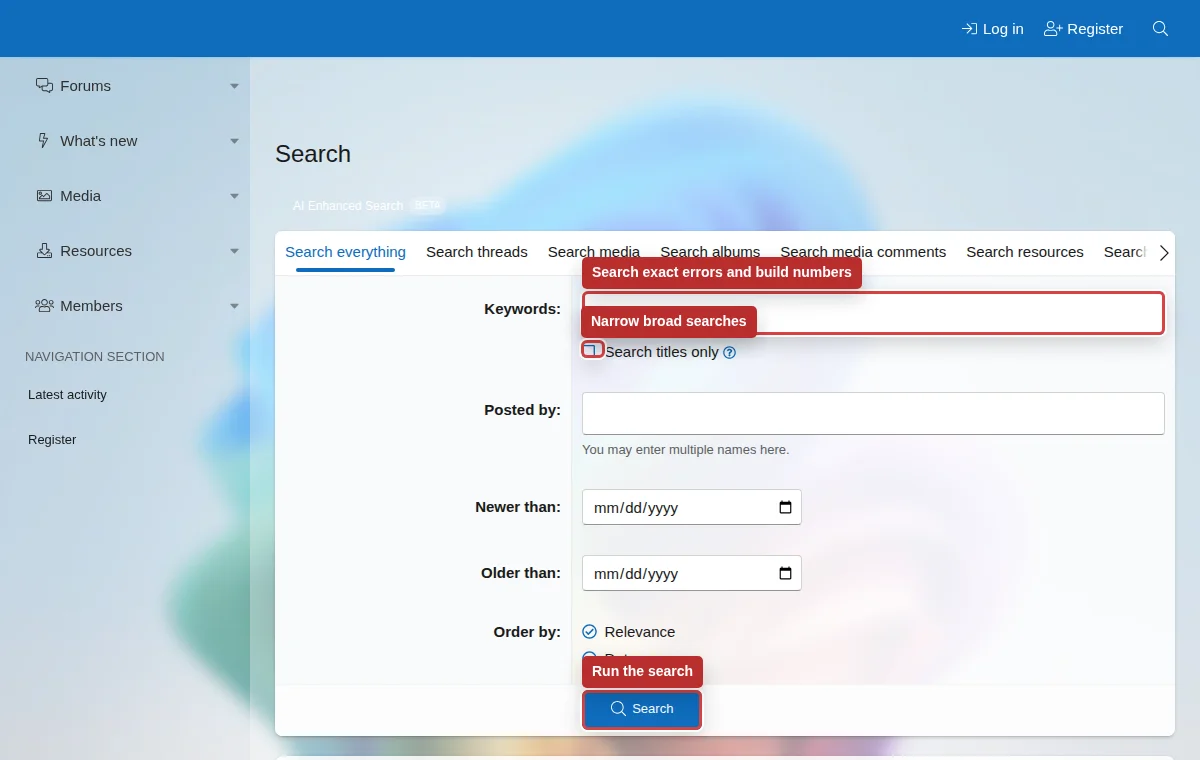
Search terms that work well
- Error codes: `0x800f0922`, `0xc000021a`, bugcheck codes, event IDs, and stop codes.
- Update identifiers: KB numbers, build numbers, release channels, and package names.
- Hardware and driver details: device model, BIOS version, GPU driver, network adapter, storage controller.
- Exact quoted text from a dialog, event log, or command output.
Advanced search
Use advanced search when you need to limit results to posts, titles, a specific member, a date range, media, resources, or profile posts.
Tags
Tags group related topics. They are useful for broad research, but exact error text is usually better for troubleshooting.
AI answers
Treat AI output as a starting point. Open the cited threads, confirm dates and versions, and do not run risky commands without understanding them.
When to start a new topic
Start a new topic when your hardware, Windows build, error details, or troubleshooting history differs from existing threads. Link the older thread if it is relevant, then explain what is different in your case.