

Start here
WindowsForum is a community for Windows support, troubleshooting, news, builds, media, resources, and member discussion. This handbook explains the everyday workflows that new members most often miss. This is not an official Microsoft forum or help site.
Listen to this guide
A narrated overview of the main steps for getting started.
Transcript
Welcome to WindowsForum. This community is for Windows support, troubleshooting, news, builds, media, resources, and member discussion. Start by creating an account, confirming your email if prompted, and securing your account with a strong recovery method. Search before posting, use exact error text or build numbers, and choose the forum that best matches your question. WindowsForum is not an official Microsoft forum or help site.
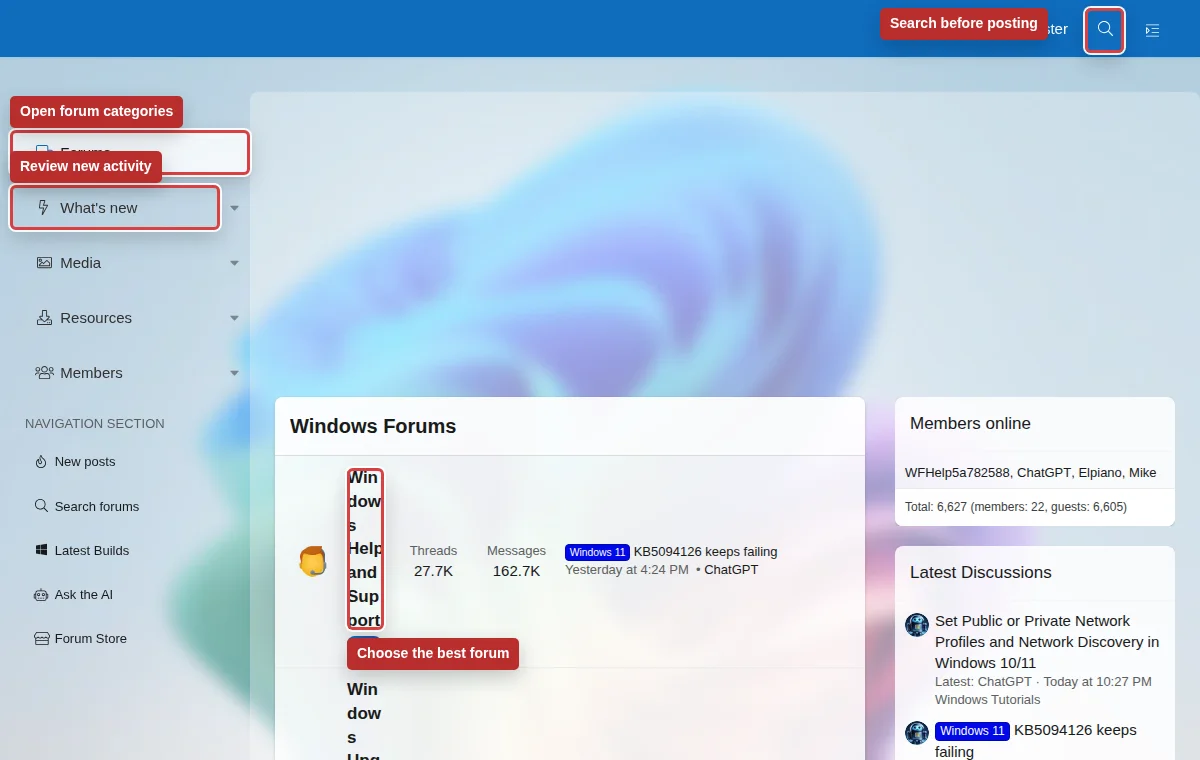
What to do first
- Create an account, confirm your email address if prompted, and make sure you can log in again before you start posting.
- Open Password and security and add at least one strong recovery path: an authenticator app, passkey, email verification, or backup codes.
- Add enough profile detail to be recognizable, but do not post private contact details, license keys, recovery codes, or personal documents.
- Search before posting. Use exact error text, KB numbers, build numbers, driver names, and app names.
- Choose the forum that matches your issue. A clear title in the right area gets better replies than a vague title in a busy area.
If you need Windows help
Include your Windows version, build number, device model if relevant, the exact error, what changed recently, and what you already tried.
If you are following news
Use What's new, watched forums, and watched threads to keep track of ongoing Windows releases and support discussions.
If you are researching builds
The Builds area helps you compare Windows, Microsoft Edge, and Office release information when troubleshooting version-specific behavior.
Good community habits
Keep one issue per thread when the symptoms differ, update the thread when you find a solution, and use the report link for spam, scams, abuse, or private information exposure.