

Write posts people can answer
A good support post gives other members enough context to reproduce, recognize, or narrow down the issue. Clear posts usually get better answers faster.
Listen to this guide
A narrated checklist for writing support posts other members can answer.
Transcript
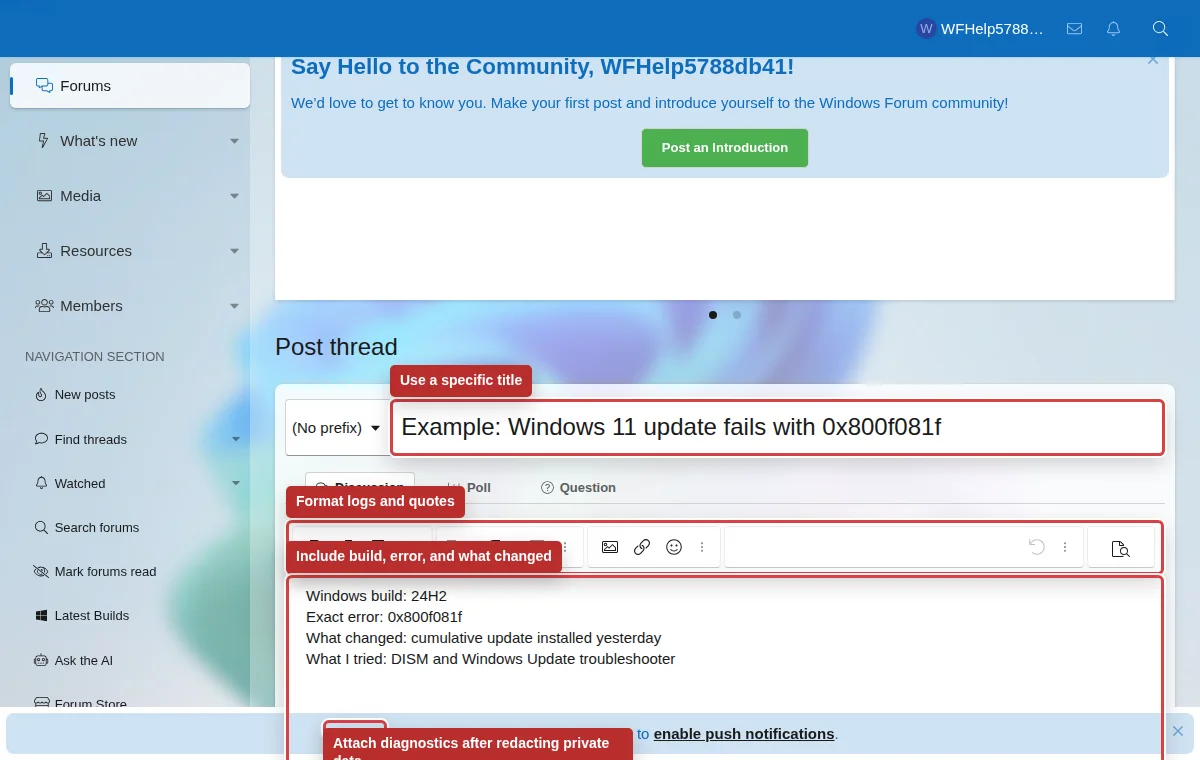
A good support post gives members enough context to understand the problem. Search first, choose the right forum, and write a specific title with the symptom, error code, update number, or build number. Include your Windows edition, version, build, device model, exact error text, and what changed recently. Use paragraphs, lists, quotes, and code blocks so logs and steps are easy to read.
Before posting a support question
- Search first using exact error text, update KB numbers, event log wording, app names, and device model numbers.
- Choose the forum that matches the issue. Installation, BSOD, networking, hardware, and software problems belong in different areas.
- Use a title that describes the symptom: “Windows 11 KB5094126 fails with 0x800f0922” is better than “Help please.”
- Explain what changed recently: update installed, driver changed, hardware replaced, new app installed, power outage, malware cleanup, or configuration change.
- List what you already tried and what happened. This avoids repeated suggestions.
Details to include
Windows edition, version, build number, device model, error codes, app version, driver name, and the exact text of the message.
Formatting
Use paragraphs, lists, quotes, and code blocks. Paste logs in code blocks or attach them when they are long.
Attachments
Attach screenshots, logs, or dumps only when they add context. Redact names, email addresses, license keys, paths, account IDs, and private messages.
Good replies
- Quote the part you are answering when a thread is busy.
- Say whether a suggestion worked or failed.
- Mark the solution clearly when the problem is resolved.
Avoid
- All-caps titles, vague “urgent” labels, or bumping repeatedly.
- Adding a different issue to an unrelated solved thread.
- Posting passwords, recovery codes, license keys, or private documents.