brkkab

Excellent Member
Joined
Mar 4, 2013
Messages
2,347
I'm having issue's in Windows 10 Pro x64 making system images. I've got Windows & Programs on a Samsung 840 Pro 256GB ssd. I created a folder in C:\Program Files(x86)\ named Games. I setup Disk Management to use this folder in Windows to store my Games on a Intel 530 Series 480GB ss I have.
My personal data (Contacts, Desktop, Documents, Downloads, Favorites, Links, Music, Pictures, Saved Games, Searches and Videos are all on a Seagate Barracuda 3.0TB hdd.
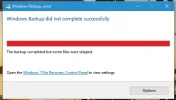
Everytime I run the Windows 7 Backup & Restore to make a backup & system image, the system image alway's fails.
Does anyone know how I can fix this?
I'm gonna have this issue again in April, if I don't find a fix now as, I'm in the process of building a new pc and only have 2 parts left to get.
Thanks everyone.
 

Attachments

Josephur

Windows Forum Admin
Staff member
Premium Supporter
Microsoft Certified Professional
Joined
Aug 3, 2010
Messages
1,289
Look in the Event Viewer for a specific error message that we can troubleshoot.
 

Neemobeer

Windows Forum Team
Staff member
Joined
Jul 4, 2015
Messages
8,998
It's either going to be in the Application log or System Log. Using powershell would be the easiest way to product a text file of the logs.
Open a powershell prompt and type
For the application log
  • Get-EventLog -LogName Application -Newest 30 -EntryType Error >> %USERPROFILE%\Desktop\Error_Events.txt
For system
  • Get-EventLog -LogName System -Newest 30 -EntryType Error >> %USERPROFILE%\Desktop\Error_Events.txt
These will create a text file on your desktop.
 

brkkab

Excellent Member
Joined
Mar 4, 2013
Messages
2,347
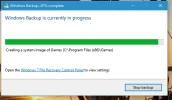
I can't remember the exact error. It's occurring at the very end. Prior to it, it does a system image of C; and then it does a system image of my hidden 2nd ssd that has my games (the 1 circled in previous scrrenshot).
I'll take a screenshot of the error in a few hours of it, as I run it weekly on early Sundays.
 

brkkab

Excellent Member
Joined
Mar 4, 2013
Messages
2,347
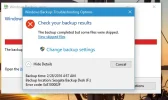
Here's 3 screenshots of what I get.
 

Attachments

  • Capture.webp
    Capture.webp
    14.5 KB · Views: 284
  • EndResult.webp
    EndResult.webp
    12.9 KB · Views: 293
  • ErrorDescription.webp
    ErrorDescription.webp
    24.3 KB · Views: 305

brkkab

Excellent Member
Joined
Mar 4, 2013
Messages
2,347
I have no clue why it's making a image of my hidden Games ssd, considering it's already imaging my Boot ssd drive C; where the games file is located. C:\Program Files(x86)\Games.
 

brkkab

Excellent Member
Joined
Mar 4, 2013
Messages
2,347
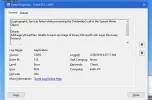
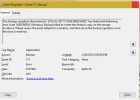
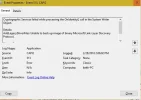
Heeres a screenshot of what Event Viewer shows in Applications, Security shows no errors in Event Viewer.
 

Attachments

  • Capture.webp
    Capture.webp
    25.9 KB · Views: 237

brkkab

Excellent Member
Joined
Mar 4, 2013
Messages
2,347
I just tried it againg this time 2 errors showed up within 2 minutes of each other. Here are the 2 screenshots.
Capture1.png was @2:04PM and Capture.png was @2:06PM
 

Attachments

  • Capture.webp
    Capture.webp
    26.9 KB · Views: 313
  • Capture1.webp
    Capture1.webp
    25 KB · Views: 330

Neemobeer

Windows Forum Team
Staff member
Joined
Jul 4, 2015
Messages
8,998
VSS isn't something I use or know really well. You might try looking at your shadow copies and clearing them out. From an elevated command prompt you can use the vssadmin command to look at the writers, particularly the system writer for problems, and look at and clear out your shadow copies.
 

brkkab

Excellent Member
Joined
Mar 4, 2013
Messages
2,347
I searched online after I posted the first set of screenshots and already followed the Administrative Command Prompt for checking the VSS writers. None showed any errors. How do I clear out the shadow copies? I formatted my backup drive earlier before I ran the 1st backup around 2 A.M. this morning.
 

brkkab

Excellent Member
Joined
Mar 4, 2013
Messages
2,347
Thanks deleted all shadow copies. In a little bit I'll try just making a system image and see what happens this time. If it doesn't work this time, I'll know that I'm done with 10 and 8.1 wi;; be going back on my new pc in April.
 

MikeHawthorne

Essential Member
Microsoft Community Contributor
Joined
May 25, 2009
Messages
6,671
Hi

Not an answer to your question, and I'm glad you got it fixed, but I've been using EaseUS TODO backup for several years and it is easier to use and more reliable than any backup software that I've ever used.

It's literally a matter of 3 clicks to create a System Image, and it's never failed to restore my computer.
It also creates a bootable repair disk in either Linux or Windows PE format.

Link Removed

You can't beat the price, Free!

Mike
 

brkkab

Excellent Member
Joined
Mar 4, 2013
Messages
2,347
B.S. We have to jump through hurdles to get 10 to work. I'm really rethinking now on whether I want 10 Pro or 8.1 Pro on the pc I'm building.
The only thing's I didn't have in 8.1 Pro, thank's to Stardock's Start8, ModernMix and Decor8, was Cortana and the privacy crap.
 

Back
Top