

Trenidor
New Member
- Joined
- Aug 11, 2010
- Messages
- 4
- Thread Author
- #1
EDIT: Ok, weirdest thing ever but suddenly there is no problem... This was like this all day until now.
Check out the picture of my desktop:
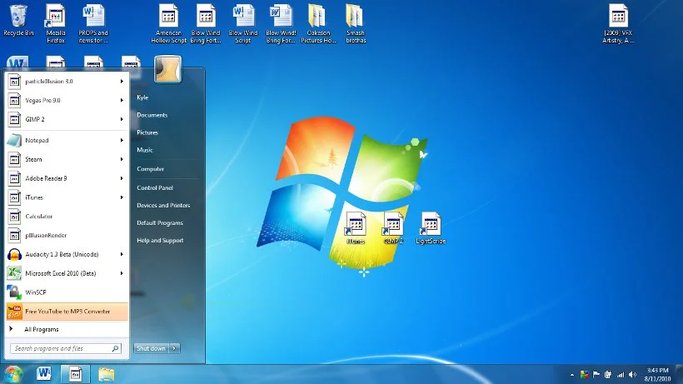
Basically most of the icon graphics for my computer disappeared and were replaced with the standard windows icon cover... (some still remain)
It's mostly annoying because I keep files on my desktop that I use frequently (pdfs that I'm reading, sound files I'm listening to, notepads, etc) and now it's a lot more difficult to find what I'm looking for because I have to look for it by name instead of shape.
The smaller icons (such as what you see in Start>allprograms> ) are in tact and if I open up explorer and look for files in small version they seem to be unphased but dunno what the deal is.
Check out the picture of my desktop:
Basically most of the icon graphics for my computer disappeared and were replaced with the standard windows icon cover... (some still remain)
It's mostly annoying because I keep files on my desktop that I use frequently (pdfs that I'm reading, sound files I'm listening to, notepads, etc) and now it's a lot more difficult to find what I'm looking for because I have to look for it by name instead of shape.
The smaller icons (such as what you see in Start>allprograms> ) are in tact and if I open up explorer and look for files in small version they seem to be unphased but dunno what the deal is.
Last edited:


