
📎 AI Summary:
The forum thread discusses an issue with Windows Media Player after a recent Windows 10 update, where strange letters appear in the search box and interfere with user input. The original poster notes that the issue has persisted since the update, with unusual character replacements occurring during typing, possibly related to Unicode or cache problems. A suggested solution involves clearing cache files and deleting the WMP library files, though no definitive fix has been confirmed.

MasterU

New Member
Joined
May 18, 2017
Messages
3
Thread Author #1
Hello all,

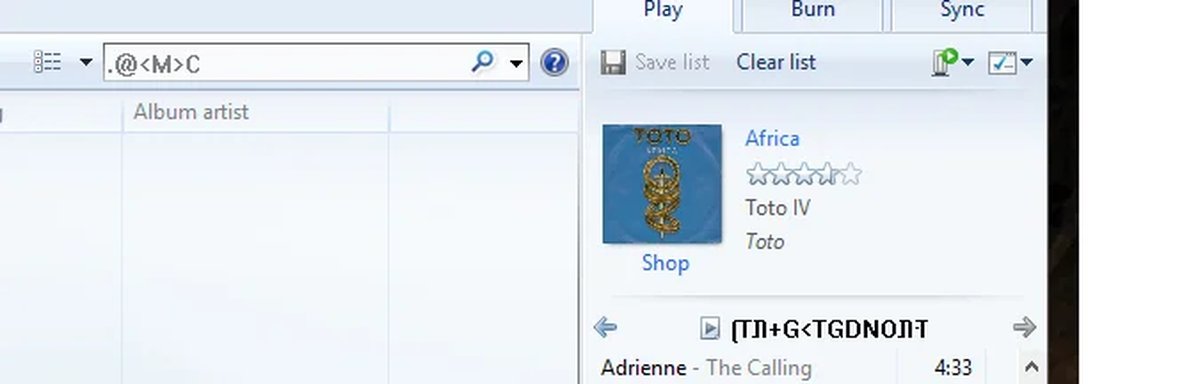
I joined to ask a question after the recent Windows 10 update. I'm a long time Windows Media Player user and after the update, weird letters appear in certain places that weren't there before. After searching for a bit I couldn't find an answer, and if it is possible to do a reset for WMP or reinstall. I posted a screenshot below and any help will be appreciated to remove those unexplained letters.

If there are any details I need to provide please let me know. Thanks in advance!
 

Attachments

  • weird-letters.webp
    weird-letters.webp
    10.3 KB · Views: 399
Solution
Try clearing the cache on documents and setting/all users/app data/microsoft/media index and delete file name wmplibrary and see if it works.

Kristeen Carter

New Member
Joined
May 21, 2017
Messages
2
Could you please let me know, what all steps you followed after starting Windows Media Player before finding this issue?
 

MasterU

New Member
Joined
May 18, 2017
Messages
3
Thread Author #3
Thanks for the reply, after I opened Windows Media Player I immediately found this issue, it's hard to miss so I'm not sure what exactly you are asking? If you mean by, did I do anything then the answer is - I only tried to restart the system and reopen the player.
 

Kristeen Carter

New Member
Joined
May 21, 2017
Messages
2
I just wanted to know what actually you did on WMP after opening it, as I can see from the screen shot, there is some random text in the search box.
 

MasterU

New Member
Joined
May 18, 2017
Messages
3
Thread Author #5
It has been always there since the update. I now noticed that when I write something in that search box it replaces the letters with other letters, for example "A" is now "<" and the letter Q is now "L", it's pretty weird and I have no clue why it is doing that. The search still gives you back the result you were searching for but the letters are weird. Is it maybe a problem with unicode or something like that?
 

Megamanx

New Member
Joined
May 25, 2017
Messages
14
Try clearing the cache on documents and setting/all users/app data/microsoft/media index and delete file name wmplibrary and see if it works.
 

Solution